githubtocolab.com is a small utility for opening GitHub-hosted Jupyter notebooks in Google Colab.
If you are looking at a notebook on GitHub, replace github.com with githubtocolab.com in the URL. The service redirects the notebook to Colab.
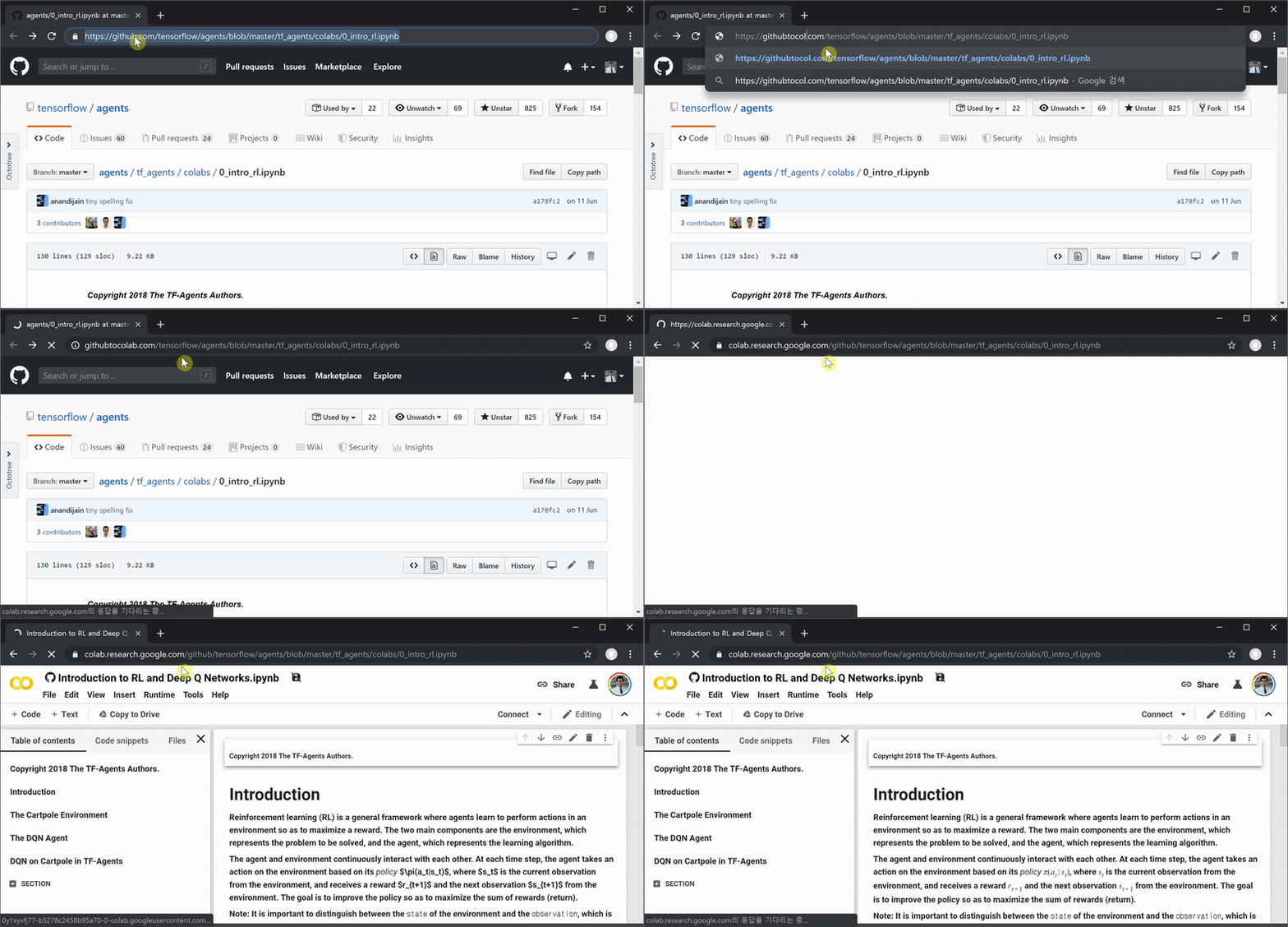
https://github.com/jax-ml/jax/blob/main/docs/notebooks/Common_Gotchas_in_JAX.ipynbbecomes:
https://githubtocolab.com/jax-ml/jax/blob/main/docs/notebooks/Common_Gotchas_in_JAX.ipynbwhich opens:
https://colab.research.google.com/github/jax-ml/jax/blob/main/docs/notebooks/Common_Gotchas_in_JAX.ipynbWhy this exists
Google Colab already supports opening notebooks from GitHub, but the direct Colab URL is longer and harder to remember.

I originally made githubtocolab.com as a mnemonic shortcut: take a GitHub notebook URL, add tocolab after github, and go directly to Colab.
The original implementation was intentionally simple. githubtocolab.com redirected the root page to a blog post explaining the project, and redirected notebook-shaped paths to Colab. The migration keeps that simple mental model, but moves the service from a hand-managed server to Cloudflare Pages/Functions so it is easier to maintain.
How to use it
1. Replace github.com with githubtocolab.com
Start with a GitHub notebook URL shaped like this:
https://github.com/<owner>/<repo>/blob/<branch>/<path>/<notebook>.ipynbChange only the hostname:
https://githubtocolab.com/<owner>/<repo>/blob/<branch>/<path>/<notebook>.ipynbgithubtocolab.com will redirect to the matching Colab URL.
2. Use the landing-page converter
The landing page also includes a converter. Paste a GitHub notebook URL, and it shows both:
- the
githubtocolab.comshortcut URL - the direct
colab.research.google.com/github/...URL
The landing page is meant to stay focused on the tool itself: a short explanation, examples, the converter, and the bookmarklet.
3. Use the bookmarklet
The landing page includes an Open in Colab bookmarklet. Drag it to your bookmarks bar, then click it while viewing a GitHub .ipynb file.
The bookmarklet skips the githubtocolab.com redirect and opens the equivalent Colab URL directly. It is useful if you want a one-click action from the GitHub page itself.
Migration
The first version was a tiny DigitalOcean/NGINX redirect that I set up while learning the basics of domains, DNS, server hosting, redirects, and HTTPS.
That was a useful way to learn, but it is more operational machinery than this service needs. A redirect utility with a static landing page and a small amount of URL validation fits better on Cloudflare Pages/Functions.
The old service redirected nearly every non-root path to Colab. The Cloudflare version is intentionally a little stricter:
| Case | Behavior |
|---|---|
/owner/repo/blob/main/notebook.ipynb |
Redirects to the matching Colab URL |
nested .ipynb paths |
Preserves the full path after /blob/ |
| non-notebook paths | Shows a friendly error page instead of redirecting blindly |
| malformed paths | Shows the expected URL shape |
/ or /about |
Shows the landing page and converter |
The goal is to preserve existing public notebook links while making bad URLs easier to understand.